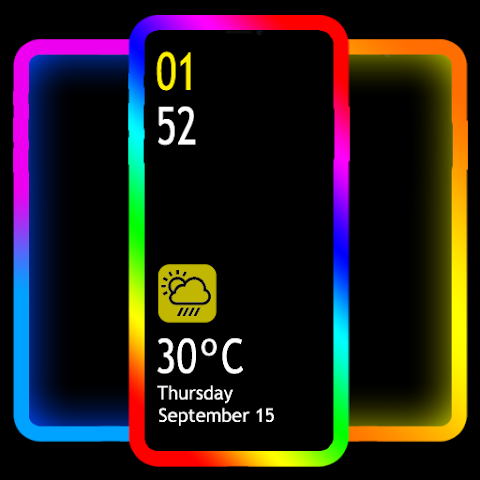

Your Android phone’s screen can look boring with just the default wallpaper, right? Well, that’s where EDGE Lighting – LED Borderlight APK comes in. This app transforms your device with eye-catching LED border effects and neon animations that make your phone stand out. Whether you’re into vibrant RGB colors, animated borders, or magical lighting patterns, this application delivers exactly what you need to personalize your device’s look.
Think of it like adding LED mood lighting to your phone – it activates on your home screen, lock screen, and even when you get calls. The best part? It’s free, lightweight, and works on virtually all Android devices.
What is EDGE Lighting – LED Borderlight APK?
EDGE Lighting – LED Borderlight is a personalization app developed by Pixel Kraft Studios that adds animated LED lighting around your phone’s screen edges. Instead of a plain border, you get dynamic, colorful light effects that respond to notifications, incoming calls, and your everyday phone usage.
The app functions as a live wallpaper, meaning it runs continuously in the background while you use other applications. It displays vibrant edge lighting in customizable colors, patterns, and animation styles that wrap around your phone’s screen borders. Many users call it a must-have personalization tool because it makes their devices feel premium and modern.
Since its first release, the app has evolved significantly. Today’s versions offer over 500 different border styles, 100+ color combinations, and advanced customization options. Whether your phone has a notch, hole-punch camera, or curved edges, this app adapts seamlessly.
Key Features & Benefits That Make It Special
EDGE Lighting packs impressive features designed to give you complete creative control over your phone’s appearance. Here’s what you get:
Extensive Color & Gradient Options
Choose from 48 pre-made gradient border color combinations, or create your own custom color blend. You can mix and match any hues you prefer, from cool blues to fiery reds, soothing greens to vibrant purples.
500+ Border Shapes & Designs
The border library is enormous. Select from hearts, stars, diamonds, emojis, smiley faces, flowers, suns, Christmas trees, snowflakes, birds, and even custom shapes. Your creativity sets the limit here.
Always-on Display (AOD/AOE) Feature
This is a game-changer. The AOD feature lets your edge lighting stay visible while you’re using other apps – gaming, chatting on WhatsApp, browsing Instagram, or watching videos. The lighting overlays perfectly on top of everything.
Edge Light Caller ID
When someone calls, your phone’s edge lights up with animated LED colors, giving you a visual notification that’s hard to miss. This feature adds both style and functionality.
4K Background Integration
Pair your edge lighting with stunning 4K wallpapers from the app’s collection, or use your own personal photos. Background presets combine curated 4K images with perfectly matched edge light colors.
Notch & Device Compatibility
The app works with every notch type – Infinity U, Infinity V, hole-punch displays, and curved edges. You can adjust notch width, height, and radius to match your exact phone specifications. It’s compatible with Samsung Galaxy S10, S20, S24, OnePlus, Xiaomi Mi, Sony, Nokia, Oppo, Vivo, and more.
Animation Direction Control
Pick from 6+ animation direction options. The light can move left to right, top to bottom, pulse outward, or follow dozens of other patterns you’ll discover in the app.
Battery-Efficient Performance
Despite the flashy effects, the app barely drains your battery. The LED animations are optimized for efficiency, so you get stunning visuals without sacrificing battery life.
Magical Borders
This exclusive feature provides unique lighting styles that go beyond standard borders. Magical borders create special visual effects with exotic LED patterns that redefine how your screen looks.
Full Customization Control
Adjust lighting color, border width, animation speed, curve radius, brightness levels, and everything in between. Nothing is locked down – total customization awaits.
EDGE Lighting vs. Similar Apps: How Does It Compare?
Several edge lighting apps exist in the Google Play Store, so it’s worth understanding what sets EDGE Lighting apart.
Comparison Table
| Feature | EDGE Lighting | Border Light AOD | Borderlight LED | Neon Edge Lighting |
|---|---|---|---|---|
| Gradient Colors | 48+ combinations | 30+ | 25+ | 20+ |
| Border Shapes | 500+ styles | 200+ styles | 150+ styles | 100+ styles |
| AOD/AOE Support | ✅ Yes | ✅ Yes | ✅ Yes | ❌ Limited |
| 4K Backgrounds | ✅ Yes | ✅ Yes | ❌ No | ❌ No |
| Notch Support | All types | Most types | Most types | Most types |
| Caller ID Feature | ✅ Yes | ✅ Yes | ✅ Yes | ✅ Yes |
| Animation Directions | 6+ options | 4 options | 5 options | 3 options |
| Battery Impact | Minimal | Minimal | Low | Low |
| Free Version | ✅ Fully Free | Free + Ads | Freemium | Free |
The Verdict: EDGE Lighting offers the most extensive feature set, the largest border shape library, and integration with high-quality 4K backgrounds. While other apps are solid, EDGE Lighting provides better customization depth and creative freedom.
Pros & Cons: The Honest Truth
Advantages
✅ Huge Variety of Customization Options – More than 500 border styles and countless color possibilities mean you’ll never run out of ways to personalize your phone.
✅ Works Across All Android Devices – From budget phones to flagship models, from different manufacturers and notch types, everything works seamlessly.
✅ Stunning Visual Effects – The LED animations are genuinely impressive and make your phone look like a gaming or premium device.
✅ Caller ID Notifications – Visual feedback for incoming calls is both stylish and practical, helping you notice calls even with sound off.
✅ Completely Free to Use – No hidden costs or premium paywalls for essential features.
✅ Minimal Battery Drain – Despite intensive animation rendering, the app is surprisingly efficient.
✅ Overlay All Applications – The AOD feature is genuinely useful for keeping your lighting visible while gaming or using other apps.
✅ Regular Updates – The developers actively improve the app, adding new border styles and fixing bugs regularly.
Disadvantages
❌ In-App Advertisements – Ads appear in the free version, though they’re not overly intrusive.
❌ Learning Curve – With so many customization options, beginners might feel overwhelmed initially.
❌ Performance Impact on Lower-End Devices – Older phones with limited RAM might experience slight lag when running complex animations.
❌ Limited Glow Effect – The app displays solid-color borders rather than gradient glows that fade into the screen.
❌ Premium Version Required for Full Features – Some advanced features may require payment to unlock completely (though most are free).
❌ App Interaction – While using the overlay feature, some phones experience difficulty interacting with elements near the edges.
Latest Updates & User Tips for Better Experience (2025)
The app receives regular updates from Pixel Kraft Studios. Recent versions (10.6+) have introduced improvements like bug fixes for notch compatibility, smoother animations for older devices, and expanded border shape libraries.
Pro Tips for Getting the Most Out of EDGE Lighting:
1. Combine Lighting with Matching Wallpapers
Don’t just pick a random color – use the app’s Background Presets feature. These pre-curated combinations pair edge colors with 4K backgrounds that complement each other visually. The result looks far more polished than mismatched combinations.
2. Adjust Animation Speed for Personal Preference
Slower animations are elegant and calming, while faster speeds feel energetic and fun. Test different speeds to match your phone usage style.
3. Use Different Border Styles for Different Moods
Your phone can reflect your mood. Set festive Christmas borders during holidays, spooky designs around Halloween, or minimalist patterns for professional settings.
4. Customize Notch Settings for Your Device
Spend time in the notch settings to perfectly match your phone’s camera placement. This prevents overlap and ensures the lighting looks intentional rather than accidental.
5. Enable AOD for Gaming Sessions
If you play games frequently, activate the Always-on Display feature. The edge lighting stays visible while you play, adding atmosphere without blocking gameplay.
6. Use Caller ID Feature for Important Contacts
Assign specific lighting colors to important people in your contacts. When mom calls, her designated light color activates. This adds a personalized notification system.
7. Layer Your Own Photos as Backgrounds
Instead of using app-provided wallpapers, upload your photos. The edge lighting looks stunning layered over personal memories.
8. Restart Phone if Animations Lag
If animations stutter or animations feel slow, a simple restart often resolves performance issues without uninstalling the app.
FAQ: Everything You Need to Know
Q1: Is EDGE Lighting completely free, or does it have hidden costs?
The app is entirely free to download and use with full access to nearly all features. While a premium version exists with ad removal and extra border shapes, the free version is genuinely feature-rich. You can customize and enjoy edge lighting without spending anything.
Q2: Will this app drain my phone’s battery significantly?
No. EDGE Lighting is optimized for battery efficiency. The app uses minimal processing power despite running constant animations. Most users report no noticeable battery impact. If your battery drains quickly, it’s likely due to screen brightness rather than the app itself.
Q3: Does the app work on my phone with a notch or hole-punch camera?
Absolutely yes. EDGE Lighting supports all notch types including Infinity U, Infinity V, Display Hole, and curved edges. You can adjust the notch width, height, and radius in settings to match your device perfectly.
Q4: Can I use EDGE Lighting while playing games or using other apps?
Yes, that’s exactly what the Always-on Display (AOD) feature does. Enable it in settings, and your edge lighting will display continuously even while you’re gaming, chatting, or browsing.
Q5: What devices does this app work on?
EDGE Lighting works on virtually every Android phone and tablet running Android 8.0 or higher. This includes Samsung Galaxy series, OnePlus, Xiaomi, Sony, Nokia, Oppo, Vivo, and hundreds of other models.
Q6: How often does the app receive updates?
Pixel Kraft Studios updates EDGE Lighting regularly, often monthly. Updates include new border shapes, bug fixes, animation improvements, and device compatibility enhancements.
Q7: Is my personal data safe when using this app?
Yes. The app primarily uses decorative features and has minimal permission requirements. Check the app’s privacy policy for specific details, but EDGE Lighting is generally considered safe to use.
Q8: Can I use my own photos as backgrounds with the edge lighting?
Yes, completely. The app lets you select any photo from your phone’s gallery to display behind the edge lighting effect. This creates highly personalized results.
Q9: Does the app work offline?
Yes. EDGE Lighting functions entirely offline. You don’t need an internet connection to run the animations or customize your settings.
Q10: How do I uninstall the app if I want to?
Some users report difficulty uninstalling this app because it integrates deeply with Android’s display settings. To uninstall, go to Settings > Apps > EDGE Lighting > Uninstall. If that doesn’t work, restart your phone while holding the power button, then attempt uninstallation again.
Installation & Download Guide
How to Install EDGE Lighting – LED Borderlight APK:
- Visit Google Play Store – Search for “EDGE Lighting” by Pixel Kraft Studios or find it at the official store link.
- Tap Install – Wait for the download and installation to complete (usually under 2 minutes).
- Open the App – Launch EDGE Lighting after installation.
- Grant Permissions – Allow necessary permissions for display settings, notifications, and file access.
- Choose Your First Design – Select a color, border shape, and animation style from the initial setup screen.
- Enable as Wallpaper – Set EDGE Lighting as your live wallpaper by tapping “Apply” or “Set as Wallpaper.”
- Customize Further – Fine-tune colors, animation speeds, widths, and notch settings in the settings menu.
Alternative Download Sources:
If you prefer, you can download the APK file from third-party sites like APKFab, APKPure, or Uptodown. However, downloading directly from Google Play is always the safest option to ensure you get the latest official version.
Conclusion & Final Thoughts
EDGE Lighting – LED Borderlight APK genuinely transforms how your Android phone looks and feels. It turns a basic device into a personalized gadget that reflects your style and personality. Whether you want subtle, elegant edge lighting or bold, vibrant neon borders, this app delivers exactly what you’re looking for.
The 500+ border shapes, extensive color customization, 4K background integration, and smart features like caller ID notifications make it stand out from competitors. It’s completely free, works on every Android device, doesn’t drain battery noticeably, and receives regular updates.
If you’ve been scrolling through your phone feeling like it looks too generic, EDGE Lighting is the simple solution. Download it today, choose your favorite border style and color combination, and watch your phone transform into something genuinely special. Your friends will ask what app makes your phone look so cool – now you’ll have the answer ready.
Ready to elevate your Android experience? Download EDGE Lighting – LED Borderlight APK from Google Play Store now and start personalizing your phone’s edges with stunning LED effects. It’s free, it’s easy, and it genuinely makes a difference in how your device looks