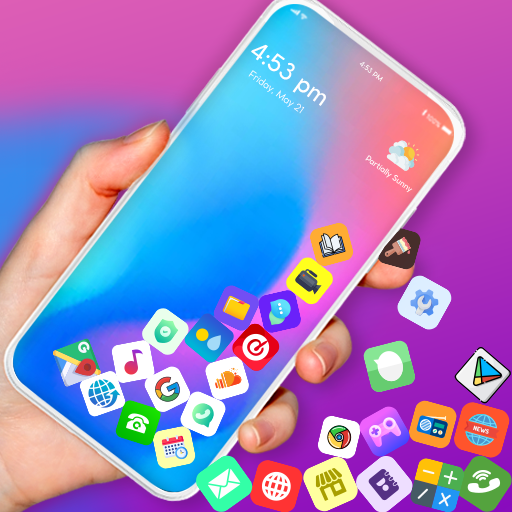

Tired of your boring home screen? Want to add some life and personality to your Android device? Rolling Icons is the fun, interactive live wallpaper app that transforms your regular launcher into a dynamic playground where app icons bounce, roll, and collide with realistic physics.
Developed by mandgFunny, this customization app lets you create a unique, eye-catching home screen experience. Whether you’re looking for entertainment or just want your phone to feel fresh and exciting, Rolling Icons delivers exactly that in a lightweight, easy-to-use package.
What Is Rolling Icons – App and Photo?
Rolling Icons is a free personalization application designed for Android devices that goes beyond typical wallpaper apps. It functions as an interactive live wallpaper that simulates a custom app launcher with gravity-based physics effects.
When installed, Rolling Icons creates a visually stunning environment where your selected app icons and custom photos behave like real objects responding to gravity, gesture movements, and device orientation. Tap an icon and the corresponding app opens instantly. Tilt your phone, and watch your icons slide and bounce across the screen in response.
The app replaces your standard home screen with an animated, interactive space where every icon has personality and motion. It’s available across multiple Android devices, supporting versions 7.0 and above, with over 10 million downloads on major app stores.
Package Details:
- Developer: mandgFunny
- Package ID: com.mandg.funny.rollingicon
- File Size: Approximately 28.5 MB
- Current Version: 2.7.0
- Release Date: December 2024 (latest update)
- Rating: 4.71/5 stars across platforms
Key Features & Benefits of Rolling Icons
Dynamic Rolling Motion with Gesture Control
The primary selling point of Rolling Icons is the way it brings your icons to life. When you swipe across your screen, icons respond naturally, rolling and sliding with momentum. This isn’t a simple animation—it’s a physics simulation that makes interactions feel satisfying and fun.
Each gesture creates a domino effect. Flick one icon and watch others tumble out of the way. The responsiveness feels natural, mimicking real-world physics rather than predetermined animation sequences.
Gravity and Collision Detection
Rolling Icons uses gyroscopic sensors to detect device movement. Tilt your phone to any angle and icons automatically fall and settle according to simulated gravity. Hold your device upside down and icons physically slide toward the bottom of the screen relative to your new orientation.
Collision detection ensures icons realistically bounce off screen edges and each other. When icons collide, you’ll see sparks and dynamic reactions, creating a visually engaging experience that keeps your home screen feeling alive.
Customization Options
Unlike standard launchers, Rolling Icons gives you complete control over appearance. You can select exactly which apps appear as rolling icons, exclude system apps you don’t use frequently, and add multiple apps to match your needs.
Choose between different backgrounds. While basic options exist, you can also set custom images as your backdrop, creating a cohesive visual theme. Want a minimalist look? Use a solid black background. Prefer personality? Add your favorite photo.
Photo and Emoji Integration
This is where Rolling Icons truly stands out. You’re not limited to app icons alone. Upload any photo from your gallery and it becomes an interactive rolling icon on your home screen. These photo icons work just like regular app icons—tap one and open your selected app.
Emoji lovers will appreciate the option to display favorite emojis as bouncing icons. Create a unique visual language on your home screen by mixing app icons, personal photos, and emoji symbols.
Full Launcher Option
For power users, Rolling Icons can serve as your complete home screen launcher. Set it as your default launcher and use it for all your app access. This transforms your entire Android experience into one seamless physics-based interface.
Lightweight and Battery Efficient
Despite its visual appeal, Rolling Icons remains relatively lightweight at 28.5 MB. The app doesn’t excessively drain battery because the physics simulations only run when you’re interacting with the home screen.
How to Download Rolling Icons APK for Android
Official Installation Methods
Via Google Play Store:
- Open the Google Play Store app on your Android device
- Search for “Rolling Icons – App and Photo”
- Look for the app by mandgFunny
- Tap “Install”
- Wait for installation to complete, then launch the app
Via APK Download Sites: If you prefer downloading the APK directly, visit trusted platforms:
- APKPure.com
- Aptoide
- APKFab.com
- Uptodown.com
Installation Steps for APK Files
- Download the APK file to your device
- Go to Settings > Security and enable “Unknown Sources”
- Locate the downloaded APK file in your file manager
- Tap the file and select “Install”
- Allow the installation to complete
- Launch Rolling Icons and follow initial setup
System Requirements
- Android Version: 7.0 or higher
- RAM: Minimum 1GB (2GB recommended for smooth performance)
- Storage: 30MB free space
- Processor: Any modern Android processor handles it well
- Permissions: Device orientation sensor access, wallpaper, app access
Installation, Setup & Configuration Guide
Initial Setup Process
After installation, Rolling Icons presents an intuitive welcome screen. The app guides you through a straightforward setup process:
- Permission Grant – Approve necessary permissions for wallpaper management and app access
- Select Apps – Choose which apps you want to appear as rolling icons
- Background Selection – Pick your preferred background image or color
- Preview – See how your custom setup looks before applying
The entire process takes under five minutes.
Step-by-Step Configuration
Choosing Your Icons: Open Settings within the app and view the complete list of installed applications. Toggle individual apps on or off. Most users disable system apps like Settings or Phone to reduce clutter. Focus on apps you actually launch regularly.
Adding Custom Photos: Navigate to the Photo section. Select “Add Photos” and browse your device gallery. Choose any image—a personal photo, meme, or artwork. The app automatically resizes it as an icon. You can designate which app opens when tapping that photo icon.
Adjusting Icon Size: Control how large or small icons appear on your screen. Smaller icons mean more can fit; larger icons make them easier to tap. Find the balance that suits your preference.
Background Customization: The app offers preset color options (black, white, dark gray) and allows custom image uploads. Choose something that complements your icon selection without overwhelming them.
Fine-Tuning Physics: Advanced users can adjust gravity sensitivity, collision response, and gesture responsiveness in the advanced settings. These tweaks let you customize how dramatically icons react to movement and touch.
Setting as Live Wallpaper vs. Full Launcher
As Live Wallpaper: Go to Settings > Wallpaper > Live Wallpaper > Rolling Icons. Your normal launcher remains active; Rolling Icons appears only on your home screen.
As Default Launcher: Requires selecting Rolling Icons as your system launcher in Settings > Apps > Default Apps > Home App. This replaces your entire interface.
Most users prefer the live wallpaper approach because it keeps system navigation intact while adding the fun visual layer.
Rolling Icons vs. Alternatives: How Does It Compare?
Rolling Icons vs. Stock Android Launcher
Stock launchers provide basic functionality but zero personality. Rolling Icons transforms your home screen into an entertainment experience. However, stock launchers are lighter on resources and offer faster performance for those prioritizing efficiency over aesthetics.
Winner: Rolling Icons for customization; Stock Launcher for performance
Rolling Icons vs. Nova Launcher
Nova is a powerhouse launcher offering extensive customization. You can change icon shapes, sizes, animations, and grid layouts. Rolling Icons focuses specifically on gravity-based physics and interactive motion rather than broad customization.
Nova handles heavy customization better. Rolling Icons delivers a more entertaining, game-like experience with less learning curve.
Winner: Nova for advanced customization; Rolling Icons for simplicity and physics fun
Rolling Icons vs. Microsoft Launcher
Microsoft Launcher integrates feeds and information cards. It’s more about productivity and information delivery. Rolling Icons prioritizes entertainment and visual engagement.
If you want a news-driven launcher, choose Microsoft. For pure fun and personalization, Rolling Icons wins.
Winner: Microsoft for productivity; Rolling Icons for entertainment
Rolling Icons vs. Other Physics-Based Wallpapers
Similar apps like “Rolling Icon: 3D Wallpaper” offer comparable physics simulations. The key differences are in UI design, customization depth, and app stability. Rolling Icons by mandgFunny performs exceptionally well with fewer crashes reported.
Comparison Table:
| Feature | Rolling Icons | Rolling Icon 3D | Stock Launcher |
|---|---|---|---|
| Physics Simulation | ✅ Advanced | ✅ Advanced | ❌ None |
| Custom Photos | ✅ Yes | ✅ Limited | ❌ No |
| Emoji Support | ✅ Yes | ❌ No | ❌ No |
| Light Resource Usage | ✅ Good | ⚠️ Moderate | ✅ Excellent |
| User Rating | ⭐ 4.71/5 | ⭐ 4.3/5 | N/A |
| Learning Curve | ✅ Easy | ⚠️ Moderate | ✅ Simplest |
Pros and Cons of Rolling Icons
Advantages
Truly Unique Home Screen: Few people use Rolling Icons, so your phone genuinely stands out. When friends see your dynamic rolling icons, they’re always impressed and want to know the app’s name.
Satisfying Interactive Experience: The physics-based feedback when tapping, swiping, and tilting your device is inherently satisfying. It transforms mundane app launching into a brief moment of entertainment.
Easy to Use: Setup takes minutes. No complex settings or steep learning curve. Open, select apps and photos, and you’re done.
Completely Free: No subscription, no hidden costs, no premium tier. The app is entirely free to download and use.
Lightweight Installation: At 28.5 MB, Rolling Icons doesn’t consume excessive storage or bog down your device.
Great for Personalizing Your Phone: Express your personality through selected apps and custom photos. Make your phone genuinely yours.
Disadvantages
Can Obscure Screen Interactions: Because icons are constantly moving, tapping the exact app you want sometimes requires precision. Fast-moving icons can be harder to tap accurately.
Ads Present: The free version includes advertisements. While not intrusive, they appear periodically, which some users find annoying.
Battery Impact: Live physics simulations drain battery slightly faster than static launchers. On a full day’s usage, expect 5-10% more battery consumption.
Limited to Home Screen (as Wallpaper): When used as live wallpaper rather than full launcher, Rolling Icons only functions on your home screen. Other screens and lock screen aren’t affected.
Gesture Conflicts: On some devices, Rolling Icons’ gesture detection can conflict with system gestures or other apps, occasionally requiring workarounds.
May Lag on Older Devices: Phones with older processors or limited RAM might experience occasional stuttering, though most devices handle it fine.
Tips, Tricks & Best Practices for Rolling Icons
Pro Tips for Maximum Enjoyment
Curate Your App Selection: Don’t add every installed app. Instead, select 8-12 frequently-used apps. Fewer icons mean more responsive interactions and a cleaner look.
Create Themes with Photos: Instead of random photos, choose images that create a cohesive theme. For example, use family photos for communication apps or scenic pictures for travel apps.
Adjust Gesture Sensitivity: If icons feel too sluggish or overly responsive, fine-tune gesture sensitivity in settings to match your preferences.
Use for Entertainment Value: Show off your setup to friends. The wow-factor when people see physics-based rolling icons never gets old.
Combine with Icon Packs: Use custom icon packs for non-rolling apps on other screens to create a unified aesthetic throughout your device.
Battery Optimization: If battery is a concern, limit your home screen customization and disable Rolling Icons when not in regular use.
Common Issues and Solutions
Icons Disappearing: Occasionally, apps or photos fail to display. Solution: Access settings, toggle the problematic app off, then on again, and it should reappear.
App Won’t Load: Ensure your Android version is 7.0 or higher. Update the app via the Google Play Store to the latest version (2.7.0).
Lag or Stuttering: Close background apps consuming resources. Consider reducing the number of visible icons, or restart your device.
Ads Appearing Too Frequently: This is normal with free apps. Alternatively, check if a premium ad-free version exists, though currently no such version is available.
Can’t Set as Default Launcher: Verify you’ve enabled Rolling Icons as default in Settings > Apps > Default Apps > Home. Some devices have different menu names—search for “Default apps” in settings.
Latest Version Updates & What’s New
Version 2.7.0 (Latest – December 2024)
The most recent update brings improved stability and performance optimization. Key improvements include:
- Better collision detection between icons
- Smoother gesture recognition
- Reduced memory consumption
- Improved compatibility with newer Android versions
- Bug fixes for less common device configurations
Version History Highlights
Version 2.6.8 (November 2024): Fixed intermittent crashing on specific Samsung and OnePlus devices.
Version 2.6.0 (Earlier 2024): Introduced emoji icon support and expanded background customization options.
Regular Updates: mandgFunny maintains consistent update schedules, typically releasing improvements every 2-3 months.
Why Update Regularly
Keeping Rolling Icons updated ensures you receive the latest performance improvements, new features, and security patches. Updates are automatically applied if you’ve enabled auto-updates in the Google Play Store.
Safety & Security Information
Is Rolling Icons Safe to Download?
Rolling Icons passes comprehensive security scans across APKPure, APKFab, and other trusted platforms. The app has been verified by industry-leading security partners and contains no malware or spyware.
Security Certifications:
- VirusTotal approved
- APKPure verified safe
- No reported security breaches or privacy violations
Permissions Explained
Rolling Icons requests the following permissions:
Wallpaper Access: Required to set the app as your live wallpaper. Completely necessary for core functionality.
App Access: Needs permission to see installed apps so it can populate your rolling icon list. No data is transmitted externally.
Device Orientation: Accesses your device’s gyroscope and accelerometer to detect tilting and movement. Standard for physics-based apps.
File Access: Limited file access for reading photos you select. Doesn’t access sensitive files like contacts, messages, or personal documents.
Privacy Practices
mandgFunny’s privacy policy explicitly states that user data isn’t collected, shared, or sold. The app functions entirely locally on your device. No account creation is required, and no personal information leaves your phone.
Frequently Asked Questions (FAQ)
Q: Is Rolling Icons truly free, or will I need to pay eventually?
A: Rolling Icons is completely free forever. The developer monetizes through non-intrusive advertisements. There’s no premium tier or hidden paywall.
Q: Can I use Rolling Icons if my Android version is older than 7.0?
A: Unfortunately, no. Rolling Icons requires Android 7.0 (Nougat) or newer. Devices running older versions cannot install or run this app. If your device is older, consider upgrading or using alternative wallpaper apps designed for older Android versions.
Q: Will Rolling Icons drain my battery significantly?
A: Battery impact is minimal. Physics simulations only run when you’re actively viewing your home screen. Throughout a typical day, expect 5-10% additional battery usage compared to a static wallpaper. Heavy home screen users might notice slightly more impact.
Q: Can I customize individual icon sizes or assign different sizes to different icons?
A: The current version applies uniform sizing to all icons. You can adjust the overall size through settings, but individual per-icon sizing isn’t available. The development team may add this feature in future updates.
Q: Does Rolling Icons work on folding phones like Samsung Galaxy Z Fold?
A: Rolling Icons generally works on folding phones, though the physics simulation behaves slightly differently on folding screens. Some users report minor positioning issues when the phone unfolds, but core functionality remains intact.
Q: Can I set Rolling Icons as my lock screen wallpaper too?
A: Currently, Rolling Icons functions only on your home screen or as the full launcher. Lock screen customization isn’t supported. You’d need a separate lock screen customization app for lock screen aesthetics.
Q: What happens if I uninstall Rolling Icons? Will my phone return to normal?
A: Yes, absolutely. Uninstalling Rolling Icons immediately restores your previous wallpaper and home screen layout. No permanent changes or residual effects occur.
Q: Is there an iOS version for Apple devices?
A: Rolling Icons is exclusively an Android application. No iOS version currently exists. If you’re an iPhone user, similar apps on the Apple App Store offer comparable physics-based wallpaper functionality, though with different implementations.
Q: How often does mandgFunny update Rolling Icons?
A: Updates typically arrive every 2-3 months. The developer maintains active development, regularly releasing performance improvements, bug fixes, and occasional new features. You’ll receive notifications when updates become available through your app store.
Conclusion
Rolling Icons – App and Photo is more than just a live wallpaper—it’s an interactive experience that transforms your Android home screen into something genuinely unique and entertaining. With physics-based gravity simulation, custom photo integration, and intuitive customization options, this free app delivers impressive personalization without complexity or cost.
Whether you’re looking to stand out with a visually stunning phone setup, want to add daily entertainment to your device interactions, or simply enjoy the satisfaction of watching physics-based animations, Rolling Icons delivers consistently.
The app’s lightweight footprint, straightforward setup process, and active developer support make it an excellent choice for anyone wanting to upgrade their Android experience. It’s been downloaded over 10 million times for good reason—users genuinely love it.
Ready to transform your home screen? Download Rolling Icons – App and Photo directly from the Google Play Store today, or grab the APK from trusted sources like APKPure or Aptoide. It takes minutes to install and instantly makes your phone more interesting.
Your friends will ask, “What is that awesome app?” And you’ll have the coolest answer on your home screen