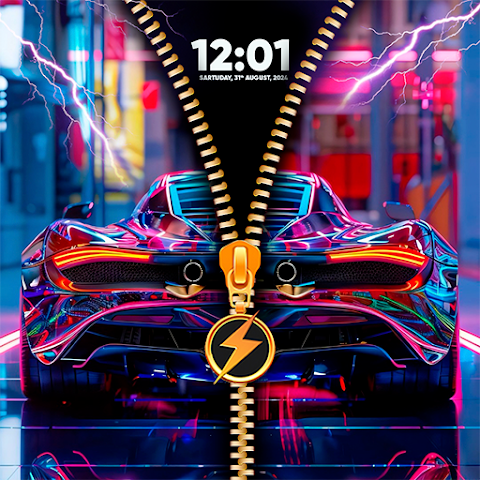

Tired of your boring default lock screen? Every time you pick up your phone, you see the same plain interface staring back at you. But what if unlocking your device could actually be fun?
That’s where Zipper Lock Screen & Wallpaper comes in. This Android app combines playful design with serious security, letting you unlock your phone by swiping a realistic zipper across your screen. In this guide, you’ll learn everything about this creative lock screen app, including its best features, how to use it, and why thousands of people are making the switch from traditional lock screens.
What Is Zipper Lock Screen & Wallpaper?
Zipper Lock Screen & Wallpaper is a free, customizable lock screen app designed to replace your Android phone’s default security interface. Instead of swiping up or entering a PIN, you unlock your device by pulling a virtual zipper down the center of your screen.
The app was built with one main goal: make phone security fun and creative without sacrificing safety.
Core Purpose:
- Add artistic flair to your phone’s first impression
- Provide an interactive and engaging unlock experience
- Maintain device security with PIN code backup protection
- Offer unlimited customization options for personal expression
It’s perfect if you want your phone to reflect your personality. Whether you’re into cute designs, neon aesthetics, superhero themes, or minimalist art, there’s something in this app for everyone.
Key Features & Benefits That Make It Stand Out
🔓 Realistic Zipper Unlock Animation
The zipper mechanism is the star feature. When you wake your phone, you see a smooth, lifelike zipper that moves exactly like a real one. Swipe it down, and boom—your phone unlocks.
This isn’t just eye candy. The realistic animation makes unlocking feel natural and satisfying, turning a daily routine into a mini moment of joy.
📱 4D Live Wallpapers & Moving Effects
Static wallpapers are yesterday’s news. Zipper Lock Screen offers dynamic, 4D live wallpapers that bring depth and motion to your lock screen.
Each wallpaper is designed to work beautifully with the zipper unlock effect, creating a cohesive visual experience. Watch your lock screen come alive every single time you check your phone.
🎨 Thousands of HD Wallpaper Categories
Browse through an extensive library of wallpapers organized by theme:
- Animals and wildlife photography
- Cartoon and anime designs
- Sports and football themes
- Cute and adorable illustrations
- Neon and abstract art
- Cars and vehicles
- Romantic and couple designs
- Superhero and action themes
- Nature and landscapes
- Chic and aesthetic wallpapers
No matter your mood or style, you’ll find something that fits.
🛠️ Deep Customization Options
The real power lies in the customization. You’re not stuck with preset designs—you can mix and match elements:
- Change zipper styles, colors, and designs
- Customize zipper tabs (stars, hearts, lightning bolts, diamonds)
- Adjust row and stitch designs
- Select from multiple wallpaper themes
- Upload your own photos from your gallery
- Add interactive sound effects to your zipper
🔒 Dual-Layer Security System
Security doesn’t get compromised for style. Zipper Lock Screen offers:
- Zipper unlock as your primary security method
- Optional PIN code for an extra protection layer
- Password and pattern lock alternatives
- Integration with your Android device’s existing security features
You get both fashion and function in one package.
📸 Preview Mode (See Before You Apply)
Not sure if a wallpaper will look good with a particular zipper style? Preview it first. The app lets you test combinations instantly before committing to the change.
This saves time and helps you craft the perfect lock screen without trial and error.
🎵 Custom Sound Effects
Want audio feedback when you unlock? Add catchy melodies or satisfying zip sounds that play during your unlock motion. Or keep it silent if you prefer a more subtle experience.
How Zipper Lock Screen Compares to Other Lock Screen Apps
The lock screen app market is crowded. Here’s how Zipper Lock Screen stacks up against alternatives:
| Feature | Zipper Lock Screen | CM Locker | Hi Locker | Stock Android |
|---|---|---|---|---|
| Unique Zipper Unlock | ✅ Yes | ❌ No | ❌ No | ❌ No |
| 4D Live Wallpapers | ✅ Yes | ⚠️ Limited | ✅ Yes | ❌ No |
| Customization Depth | ✅ Extensive | ✅ Extensive | ✅ Good | ⚠️ Minimal |
| Sound Effects | ✅ Yes | ✅ Yes | ✅ Yes | ❌ No |
| PIN Protection | ✅ Yes | ✅ Yes | ✅ Yes | ✅ Yes |
| Free to Download | ✅ Yes | ✅ Yes | ✅ Yes | ✅ Yes |
| Widget Support | ⚠️ Basic | ✅ Full | ✅ Full | ✅ Full |
| Ad-Free Option | ❌ No | ⚠️ Premium | ⚠️ Premium | ✅ Yes |
The Difference:
Zipper Lock Screen wins on novelty. While other apps offer similar customization and security features, few provide the engaging, interactive zipper mechanic. If you want a lock screen that’s both stylish and unique, this app delivers.
Other apps like CM Locker focus heavily on security features (like intruder selfies). Hi Locker emphasizes minimalism and battery efficiency. Stock Android prioritizes simplicity and integration.
Zipper Lock Screen balances all three: creativity, functionality, and security in one cohesive package.
Pros & Cons: What Users Really Love (and Dislike)
✅ What’s Great About It
Unique & Fun Factor: The zipper unlock mechanic is genuinely different. No other mainstream lock screen does this, so it immediately sets your phone apart.
Huge Theme Library: With thousands of wallpapers, you’ll never run out of fresh designs. New themes update regularly.
Easy to Use: Downloading, installing, and customizing takes minutes. No technical knowledge required. The intuitive interface guides you through every step.
Realistic Animations: The zipper movement is smooth and satisfying. It feels polished, not cheap or buggy.
Personal Photo Support: Turn your favorite memories into your lock screen. Upload photos from your gallery and customize them with zipper overlays.
Free & Lightweight: The app is free to download and doesn’t hog your device resources. It performs smoothly on older and newer phones alike.
⚠️ What Could Be Better
Ad Frequency: The free version includes ads. Some users report that ads appear frequently, especially when previewing wallpapers or customizing designs. (Ads help keep the app free, but they can interrupt your experience.)
Battery Impact (For Live Wallpapers): The 4D and moving wallpapers are beautiful, but they consume more battery than static designs. If you’re concerned about battery life, use regular wallpapers instead.
Limited Widget Integration: While you can add some widgets, the selection isn’t as extensive as dedicated lock screen apps like Hi Locker.
Permission Requirements: The app needs display-over-other-apps permission to function, which some users feel uncomfortable granting.
Occasional Wallpaper Saving Issues: A small number of users report that wallpapers sometimes fail to apply properly, especially on devices with battery-saving mode enabled.
How to Use Zipper Lock Screen & Wallpaper: Step-by-Step Guide
Getting started is simple. Follow these steps to set up your custom zipper lock screen:
Step 1: Download & Install
- Visit Google Play Store or Apple App Store
- Search for “Zipper Lock Screen & Wallpaper”
- Tap “Install” and wait for the download to complete
- Accept the required permissions when prompted
Step 2: Open the App & Browse Wallpapers
- Launch the app after installation
- You’ll see categories of wallpapers (animals, neon, sports, etc.)
- Tap on any wallpaper to preview it in full screen
Step 3: Customize Your Zipper Style
- Select your preferred wallpaper
- Tap “Customize” to access the zipper editor
- Choose your zipper style (standard, heart-shaped, star-shaped, etc.)
- Pick a zipper color that complements your wallpaper
- Adjust the row/stitch design if desired
Step 4: Add Sound Effects (Optional)
- Browse available zip sounds (satisfying, heroic, fun, creepy, etc.)
- Select one or keep it silent
- Test the sound effect before finalizing
Step 5: Preview Your Design
- The app shows a live preview of your lock screen
- Swipe the virtual zipper to see how it unlocks
- If you love it, proceed to the next step. If not, go back and adjust
Step 6: Apply & Set Up Security
- Tap “Apply” to set it as your lock screen
- Grant necessary permissions (display overlay, etc.)
- Set a PIN code for an additional security layer (optional but recommended)
- Turn off your phone and turn it back on to see your new lock screen
Step 7: Enjoy & Update Regularly
- Your lock screen is now active
- Return to the app anytime to change themes
- Check for weekly updates with new wallpapers and features
Pro Tip: Use static wallpapers if you want better battery life, or stick with 4D live wallpapers if you don’t mind the trade-off for stunning visuals.
Latest Updates & Tips for Better Experience (2025)
Recent Version Improvements
The latest versions of Zipper Lock Screen include:
- Improved Zipper Animations: Smoother, more realistic unlock effects
- Better Performance Optimization: Reduced lag and improved stability on all Android versions
- Expanded Theme Library: 100+ new 3D zipper designs and wallpaper categories added this year
- Enhanced Security: Better integration with modern Android security standards
- Battery Optimization: New options to reduce battery drain from live wallpapers
Tips for Maximum Enjoyment
1. Turn Off Battery Saving Mode If your wallpaper disappears after applying, disable battery saver. Some devices restrict app permissions in power-saving mode, affecting wallpaper persistence.
2. Use Preview Before Applying Test your customization in preview mode first. This saves time and helps you avoid combinations you won’t like.
3. Mix & Match Regularly The app updates new wallpapers weekly. Spend 5 minutes monthly refreshing your lock screen with trending designs.
4. Upload Personal Photos Make your lock screen truly personal by uploading photos of loved ones, travel memories, or aesthetic shots from your gallery.
5. Pair with Matching Home Screen Wallpaper For a cohesive look, choose a complementary wallpaper for your home screen. The app suggests matching options.
6. Enable Sound Effects Strategically Use sound effects during the day for fun, but disable them at night if the sound disturbs your sleep.
7. Backup Your Favorite Customizations Take screenshots of your favorite zipper/wallpaper combinations so you can recreate them later if needed.
Frequently Asked Questions (FAQs)
❓ Is Zipper Lock Screen & Wallpaper completely free to use?
Yes, the app is free to download and use. The free version includes thousands of wallpapers and all core customization features. However, the free version displays ads. If you want an ad-free experience, the app offers in-app purchases for a premium version, though the basic features are fully functional without paying.
❓ Does this app work on all Android devices?
The app works on most Android devices running Android 4.4 or higher. Newer devices (Android 10 and above) have the best performance and animation quality. Older phones may experience slower animations or reduced visual effects, but the app is lightweight enough to run on most systems.
❓ Will this app drain my battery?
The impact depends on your settings. Static wallpapers have minimal battery impact. However, 4D live wallpapers and moving animations use more power since your screen is constantly rendering motion effects. If battery life is a concern, stick with regular wallpapers. Alternatively, set the live wallpaper to activate only when your phone is charging.
❓ How secure is the zipper lock compared to PIN or fingerprint lock?
The zipper unlock is fun and unique, but it’s technically less secure than fingerprint or face recognition because it’s pattern-based. However, the app lets you add a PIN code for additional security. For maximum protection, enable the dual-layer security system (zipper + PIN code).
❓ Can I use my own photos as a lock screen wallpaper?
Absolutely. The app allows you to upload photos from your phone’s gallery. You can crop, edit, and customize your photos with the zipper overlay. This is perfect for personalizing your lock screen with family photos, travel memories, or your favorite aesthetic images.
❓ What if the wallpaper doesn’t save or apply correctly?
If your customized lock screen disappears after applying:
- Turn off battery-saving mode (it restricts app permissions)
- Clear the app’s cache (Settings > Apps > Zipper Lock Screen > Storage > Clear Cache)
- Reinstall the app if the problem persists
- Check that you’ve granted all necessary permissions, especially “display over other apps”
❓ How often are new wallpapers added?
The app updates with 100+ new themes weekly. You’ll find fresh designs, seasonal themes, and trending aesthetic wallpapers regularly. Check back monthly to discover the latest additions.
Conclusion
Zipper Lock Screen & Wallpaper isn’t just another lock screen app—it’s a statement. It transforms the mundane act of unlocking your phone into an enjoyable, personalized experience that reflects who you are.
Whether you want a cute puppy lock screen, a superhero zipper design, or a neon aesthetic that turns heads, this app delivers unlimited customization without breaking a sweat. The realistic zipper animation, massive wallpaper library, and easy setup make it accessible to everyone, regardless of technical skill.
Yes, the free version has ads, and live wallpapers do drain some battery. But for most users, these minor trade-offs are worth the creative freedom and visual appeal you get in return.
Ready to upgrade your lock screen? Download Zipper Lock Screen & Wallpaper today from the Google Play Store or Apple App Store. Spend just 5 minutes customizing your setup, and you’ll enjoy a fresh, fun unlock experience every single day.
Your phone deserves to look as good as it works. Make the switch now and join thousands of users who’ve already transformed their lock screens into personal works of art.