
Most people think airplane mode has one purpose: to keep your phone quiet during a flight. You switch it on when the crew asks, wait a few hours, and turn it back off when you land. That is the beginning and end of the story for most users.
But there is actually a lot more going on here.
Airplane mode is one of the most underused tools sitting right on your phone. With a few smart habits, it can help protect your privacy, speed up your internet connection, charge your battery faster, and even help you focus better during your day.
This article walks you through the real, practical ways to use airplane mode more effectively. No technical background required. Whether you use an Android phone or an iPhone, these tips work for everyday users who simply want to get more out of their device.
What Is Airplane Mode, Really?
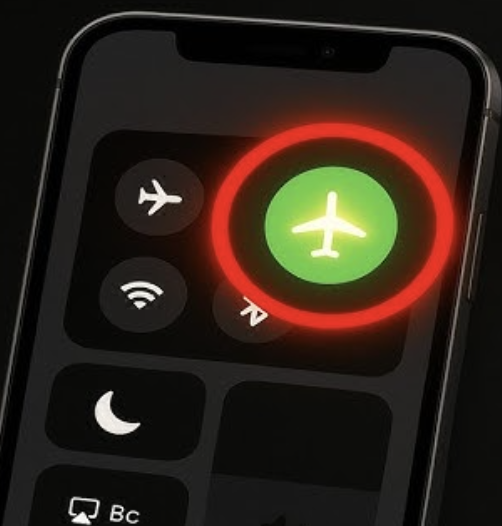
Airplane mode is a setting on your smartphone that disables all wireless transmissions at once. When you turn it on, it cuts off your cellular connection, Wi-Fi, Bluetooth, and GPS signals simultaneously.
The name comes from the aviation rule that passengers should not use devices that transmit radio signals during flights, since those signals can theoretically interfere with aircraft systems. So phone makers added a single switch that kills all transmissions in one tap.
But here is the part most people miss: airplane mode does not have to be an all-or-nothing switch. On most modern phones, you can turn on airplane mode and then manually re-enable specific features like Wi-Fi or Bluetooth individually. This gives you much finer control over what your phone is broadcasting at any given time.
That is where the real tricks begin.
Key Benefits of Using Airplane Mode Strategically
Before getting into the how-to, it helps to understand why these tricks are worth your time. Here are the main benefits users experience when they start using airplane mode more deliberately.
Privacy protection: When your phone is not connected to a cellular network, it is not pinging cell towers or sending location data through carrier networks. This reduces how much passive data your phone shares without your direct input.
Faster charging: Your phone charges noticeably faster in airplane mode because the battery is not being drained by constant network searching, background app refreshes, or push notifications while it charges.
Better signal after poor connectivity: Toggling airplane mode off and on forces your phone to reconnect to the nearest and strongest cell tower. This is a well-known trick for fixing dropped calls or weak signal in areas where your phone is struggling.
Reduced distractions: Cutting all wireless signals means no calls, no texts, no notification pings. It is one of the cleanest ways to create a focused, interruption-free window in your day.
Longer battery life: When you are in an area with very weak signal, your phone works overtime trying to find a connection. Airplane mode stops that process completely, which can save a meaningful amount of battery.
Cleaner internet connections via Wi-Fi only: By enabling airplane mode and then manually turning Wi-Fi back on, you can use internet services without your phone transmitting over cellular frequencies at the same time.
How Airplane Mode Actually Works on Your Phone
When you activate airplane mode, your phone’s operating system sends a command to disable all radio frequency transmitters. Here is a simple breakdown of what gets switched off and why each matters.
Cellular radio: This is the main transmitter your phone uses to connect to your carrier’s network. Turning it off means no calls, no SMS, and no mobile data.
Wi-Fi radio: This handles your connection to home networks, office networks, and public hotspots. It is disabled by default in airplane mode, but you can turn it back on manually.
Bluetooth: This handles short-range wireless connections to devices like headphones, speakers, and smartwatches. Like Wi-Fi, it can be re-enabled while airplane mode stays on.
GPS receiver: Technically GPS is a receiver, not a transmitter. Your phone listens to satellite signals rather than sending them. However, many phones disable GPS in airplane mode too. You can usually re-enable it manually.
NFC (Near Field Communication): This short-range feature handles tap-to-pay and contactless transfers. It is also cut off in airplane mode.
The key insight is that these features are modular. You are not locked into disabling all of them just because airplane mode is on.
The Best Secret Airplane Mode Tricks Worth Knowing
This is where things get genuinely useful. These are the tricks that make a real difference in day-to-day phone use.
Use It as a Speed Charger
This is probably the most immediately useful trick for most people. If you need to charge your phone quickly and you only have 20 to 30 minutes, turn on airplane mode before you plug in.
With all wireless radios off and background processes reduced, your phone draws power without competing demands on the battery. Most users see a 20 to 30 percent improvement in charging speed compared to charging with the phone fully active. If you combine this with keeping the screen off, the results are even better.
Fix a Weak or Dropped Signal in Seconds
If you are in an area where your signal keeps dropping or you cannot get a call to connect, the standard fix is to restart your phone. But that takes time. A faster method is to switch airplane mode on, wait about 10 seconds, then switch it back off.
This forces your phone to drop its current tower connection and scan fresh for the strongest available signal in your area. It takes about 15 to 20 seconds total and often resolves weak signal issues immediately.
Protect Your Location Privacy in Specific Situations
Your phone constantly communicates with cell towers even when you are not actively using it. These tower pings create a rough location record tied to your carrier account. If you are somewhere you would prefer not to have logged, activating airplane mode cuts that data trail.
This is not about anything suspicious. Many privacy-conscious users do this when visiting medical facilities, attending sensitive meetings, or simply during personal time when they would rather their carrier not have a timestamped record of their whereabouts.
Create a Private Wi-Fi-Only Mode
Here is a trick that combines privacy with functionality. Turn on airplane mode to cut your cellular connection, then manually turn Wi-Fi back on. Now your phone works entirely through your internet connection without touching your cellular network.
This means apps and websites you use cannot distinguish your traffic by a carrier-assigned IP address. You are also not broadcasting your phone number to any nearby cell tower during this time. For everyday privacy, this is a low-effort and effective habit.
Use It for Focused Work Sessions
If you need to concentrate without completely turning your phone off, airplane mode gives you a middle ground. No calls come through, no text messages pop up, and no app notifications pull your attention. But your phone is still available if you need it for a timer, calculator, camera, or offline apps.
Many productivity-focused users treat airplane mode as their version of a do-not-disturb setting, but with fewer exceptions and less complexity to configure.
Better Sleep Without Completely Powering Down
Some people prefer to keep their phone on overnight for alarm purposes, but are concerned about overnight data transmission and the disturbance of late-night notifications. Airplane mode solves this cleanly. Your alarm still works because it is a local function, not a network-dependent one. But your phone is not receiving messages, syncing email, or pinging towers while you sleep.
dvantages and Limitations of Airplane Mode Tricks
Like any tool, airplane mode has genuine strengths and a few real limitations worth being honest about.
Advantages include simplicity, since it is a single switch available on every smartphone. It requires no additional apps, no settings to configure in depth, and no technical knowledge. The privacy and charging benefits are real and measurable. The signal reset trick works reliably across both major platforms.
Limitations are also real. When airplane mode is on and you have not manually re-enabled Wi-Fi, you are fully offline. Emergency calls may not be possible depending on your location and local regulations, though many countries allow emergency calls even in airplane mode. GPS tracking through some apps may still work if you have manually re-enabled location services. And if someone is trying to reach you urgently, they will get no response until you switch airplane mode off.
It is also worth noting that airplane mode is not a full privacy shield. If your Wi-Fi is on, your internet activity can still be tracked by your network provider, websites you visit, and apps running in the background. It addresses cellular-specific privacy concerns, not all privacy concerns.
Best Practices for Getting the Most Out of Airplane Mode
These practical habits will help you use this feature more effectively.
Make the quick-charge habit part of your routine. Any time you sit down for a meal, a meeting, or a short break and want to top up your battery, flip airplane mode on while charging. The difference adds up over a day.
Use it during focused work blocks. Treat it like the phone equivalent of closing your office door. Set a timer for 25 to 50 minutes, turn on airplane mode, and work without interruption. You will get through tasks faster.
Combine it with low-power mode on long travel days. If you are spending a day in transit and cannot charge easily, airplane mode combined with low-power mode extends battery life significantly. You can toggle it off briefly to send messages or check directions, then back on when you do not need data.
Test the signal reset trick before assuming your phone needs a restart. It is faster and achieves the same result in most cases.
Check your location settings if privacy is your main concern. Airplane mode limits cellular-based location tracking, but if you manually re-enable GPS and Wi-Fi, location data can still be accessed by apps you have granted permission to.
Common Mistakes to Avoid
Assuming airplane mode means complete privacy: It reduces your exposure meaningfully, but if Wi-Fi is on and you are browsing, your internet traffic is still visible to your network and the websites you visit. For deeper privacy, a VPN combined with airplane mode and Wi-Fi is a more complete approach.
Forgetting that alarms still work: Many users power their phone fully off at night thinking that is necessary for quiet sleep. Airplane mode handles the noise and notification problem just as well, and your alarm clock function remains fully operational.
Not waiting long enough during a signal reset: When you toggle airplane mode off after using it to reset your signal, give your phone 15 to 20 seconds to reconnect before assuming the trick did not work. Rushing the process means your phone may not have finished scanning for the best available tower.
Using airplane mode in emergencies without knowing your local rules: In most countries, emergency services calls override airplane mode restrictions. But it is worth knowing your local regulations rather than assuming.
Enabling Bluetooth and Wi-Fi carelessly after airplane mode: If your reason for using airplane mode is privacy, turning Bluetooth back on in a public space re-exposes your device to Bluetooth scanning by nearby devices. Be selective about what you re-enable and when.
Frequently Asked Questions
Does airplane mode stop all location tracking?
It significantly limits cellular-based location tracking by disconnecting your phone from carrier towers. However, if you manually re-enable Wi-Fi or GPS while in airplane mode, apps with location permission can still access your location. For complete location privacy, keep GPS and Wi-Fi disabled while airplane mode is on.
Can I still use apps in airplane mode?
Yes. Any app that works offline will function normally. This includes camera apps, note-taking apps, offline music players, downloaded maps, and games that do not require an internet connection. Apps that need real-time data such as social media, navigation with live traffic, and messaging will not work unless you re-enable Wi-Fi.
Does airplane mode actually charge my phone faster?
Testing by users and technology reviewers consistently shows a meaningful improvement in charging speed when airplane mode is on. The exact improvement varies by phone model, but figures of 20 to 30 percent faster charging are commonly reported. The reason is that the battery is not being drained simultaneously by network radios and background syncing.
Is it safe to use airplane mode overnight regularly?
Yes, completely. There are no hardware or software risks associated with using airplane mode overnight. It is a normal operating mode that your phone is designed to handle. Your alarm will still work, your phone will retain its settings, and your apps will resume normally when you turn airplane mode off in the morning.
Can I receive emergency calls in airplane mode?
In many countries, emergency calls are allowed even in airplane mode because the phone retains the ability to make such calls as a safety baseline. However, this varies by country and carrier. It is worth verifying the rules in your specific country rather than assuming.
Why does airplane mode fix weak signal issues?
When your phone has been connected to a particular cell tower for a long time, it sometimes clings to that connection even when a stronger tower is nearby. Airplane mode forces the phone to disconnect entirely. When you switch it back off, the phone scans fresh for all available towers and connects to the strongest signal, which is often better than what it was holding onto before.
Conclusion
Airplane mode is genuinely one of the most flexible and underestimated tools on your smartphone. Used creatively, it can protect your privacy in ways most users have never considered, charge your battery faster on a tight schedule, fix connectivity problems in seconds, and help you carve out real focus time in a notification-heavy world.
The tricks covered here do not require technical skill or third-party apps. They are built into the device you already carry. The only thing needed is awareness of what airplane mode actually does and the habit of reaching for it beyond the narrow context of a flight.
Start with one or two of these habits, such as the quick-charge trick or the signal reset method, and build from there. Small changes in how you use existing phone features add up to a noticeably better experience over time.
Explore more practical smartphone tips and privacy habits to get even more out of your everyday technology.